
1. General Purpose Registers Overview
The x86 architecture has a set of general-purpose registers used for arithmetic operations, data movement, and addressing. The main registers include:
rax: Accumulator register (can be accessed aseax,ax,alfor lower-order access)rbx: Base register (can be accessed asebx,bx,bl)rcx: Counter register (can be accessed asecx,cx,cl)rdx: Data register (can be accessed asedx,dx,dl)rsi: Source index register (can be accessed asesi,si,sil)rdi: Destination index register (can be accessed asedi,di,dil)rbp: Base pointer register (can be accessed asebp,bp,bpl)rsp: Stack pointer register (can be accessed asesp,sp,spl)
In 64-bit mode (x86-64), each of these registers is 64-bits wide and can be accessed at different widths depending on the needs of the instruction set.
Partial Register Access
One of the significant features of the x86 architecture is the ability to access parts of a register:
- The full 64-bit register (e.g.,
rax,rbx). - The lower 32-bits of a register (e.g.,
eax,ebx). - The lower 16-bits of a register (e.g.,
ax,bx). - The lower 8-bits of a register (e.g.,
al,bl).
Here’s a table illustrating partial register access using rax:
| Register | Bits Accessed | Example Usage |
|---|---|---|
rax |
Full 64-bits | General operations in 64-bit code |
eax |
Lower 32-bits | Zeroes out the upper 32 bits |
ax |
Lower 16-bits | Used in legacy 16-bit code |
al |
Lower 8-bits | Byte-sized operations |
Memory Addresses
As previously mentioned, x86 64-bit processors have 64-bit wide addresses that range from 0x0 to 0xffffffffffffffff, so we expect the addresses to be in this range. However, RAM is segmented into various regions, like the Stack, the heap, and other program and kernel-specific regions. Each memory region has specific read, write, execute permissions that specify whether we can read from it, write to it, or call an address in it.
Whenever an instruction goes through the Instruction Cycle to be executed, the first step is to fetch the instruction from the address it’s located at, as previously discussed. There are several types of address fetching (i.e., addressing modes) in the x86 architecture:
| Addressing Mode | Description | Example |
|---|---|---|
Immediate |
The value is given within the instruction | add 2 |
Register |
The register name that holds the value is given in the instruction | add rax |
Direct |
The direct full address is given in the instruction | call 0xffffffffaa8a25ff |
Indirect |
A reference pointer is given in the instruction | call 0x44d000 or call [rax] |
Stack |
Address is on top of the stack | add rsp |
Data Movement
In x86-64 assembly, instructions tell the CPU what actions to perform. Each instruction is typically made up of two main components:
- Opcode: Specifies the operation to be performed (e.g.,
mov,add,jmp). - Operands: Specifies the data or registers the operation will act upon (e.g.,
rax, memory addresses, or immediate values).
Instruction Flow
Assembly instructions generally flow from right to left. This means the value on the right-hand side is moved or manipulated and its result is stored in the left-hand side register or memory location.
Example:
mov rax, rbx ; Move the value in rbx into rax
Control Flow
Control flow in assembly language is determined by conditional and unconditional jumps.
Unconditional Jumps
- These instructions redirect the execution flow without any condition.
jmp: Directly jumps to another part of the program.call: Calls a function (saves the return address on the stack).ret: Returns from a function (pops the return address from the stack).
Conditional Jumps
Conditional jumps depend on the status flags stored in the flags register (eflags). The condition is evaluated, and if it holds true, the jump is executed.
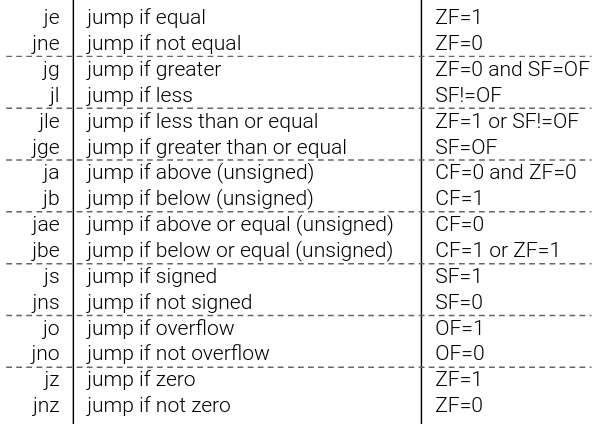
Examples of conditional jumps include:
je(jump if equal): Jumps if the result of a comparison is equal (zero flagZFis set).jne(jump if not equal): Jumps if the comparison result is not equal (zero flagZFis clear).jg(jump if greater): Jumps if one value is greater than the other (sign flagSFand overflow flagOFare used).jl(jump if less): Jumps if one value is less than the other.ja(jump if above): Jumps if a value is above another (used for unsigned comparisons).jb(jump if below): Jumps if a value is below another (used for unsigned comparisons).
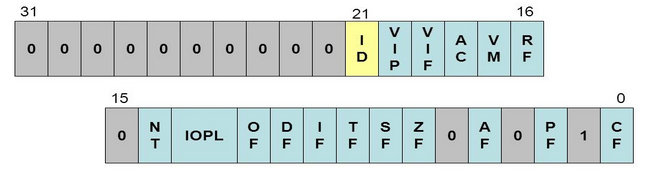
EFLAGS Register
The eflags register is crucial in determining the result of arithmetic operations and conditional jumps. It is updated by instructions like cmp and test.

Key Flags in eflags:
ZF(Zero Flag): Set if the result of an operation is zero.SF(Sign Flag): Set if the result is negative.OF(Overflow Flag): Set if an arithmetic overflow occurs.CF(Carry Flag): Set if an unsigned overflow occurs.PF(Parity Flag): Set if the number of 1-bits in the result is even.
cmp (compare) and test (test) Instructions
cmp: Subtracts the right operand from the left and updates the flags based on the result. No result is stored; only flags are affected.
Example:
cmp rax, rbx  ; Compare rax and rbx
je equal_label  ; Jump to equal_label if rax == rbx
test: Performs a bitwise AND between operands and updates flags without storing the result. Often used to check if specific bits are set.
Example:
test rax, rax  ; Test if rax is zero
jz zero_label  ; Jump if rax is zero (ZF is set)
System Calls
A system call is a way for a program to request services from the operating system’s kernel. In x86-64 Linux, the system call interface is highly standardized and rarely changes, making it a powerful and stable interface for interacting with OS-level resources like file systems, network stacks, and process control.
System calls are initiated by the syscall instruction.
Making a System Call
- The
raxregister is set with the system call number (each system call has a unique identifier). - Arguments for the system call are passed in
rdi,rsi,rdx,r10,r8,r9, depending on the system call. - The
syscallinstruction is executed to invoke the system call.
Example:
mov rax, 60     ; syscall number for exit
mov rdi, 0      ; exit status
syscall         ; invoke system call
In this example, rax is set to 60, the syscall number for the exit function, and rdi is set to 0 as the exit status. The syscall instruction triggers the exit process.
Common System Call Numbers:
60- exit: Terminates the process.1- write: Writes data to a file descriptor.0- read: Reads data from a file descriptor.
For a complete list of Linux system call numbers, refer to this resource.
Conditional Bit Layout Diagram
Here’s an illustration of how the conditional bit layout works within the eflags register, showcasing how flags like ZF, SF, and OF contribute to conditional jumps:
Data Types
Finally, the x86 architecture supports many types of data sizes, which can be used with various instructions. The following are the most common data types we will be using with instructions:
| Component | Length | Example |
|---|---|---|
byte |
8 bits | 0xab |
word |
16 bits - 2 bytes | 0xabcd |
double word (dword) |
32 bits - 4 bytes | 0xabcdef12 |
quad word (qword) |
64 bits - 8 bytes | 0xabcdef1234567890 |
Whenever we use a variable with a certain data type or use a data type with an instruction, both operands should be of the same size.
For example, we can’t use a variable defined as byte with rax, as rax has a size of 8 bytes. In this case, we would have to use al, which has the same size of 1 byte. The following table shows the appropriate data type for each sub-register:
| Sub-register | Data Type |
|---|---|
al |
byte |
ax |
word |
eax |
dword |
rax |
qword |
Assembly and Disassembly
| Command | Description |
|---|---|
nasm -f elf64 helloWorld.s |
Assemble code |
ld -o helloWorld helloWorld.o |
Link code |
ld -o fib fib.o -lc --dynamic-linker /lib64/ld-linux-x86-64.so.2 |
Link code with libc functions |
objdump -M intel -d helloWorld |
Disassemble .text section |
objdump -M intel --no-show-raw-insn --no-addresses -d helloWorld |
Show binary assembly code |
objdump -sj .data helloWorld |
Disassemble .data section |
GDB
| Command | Description |
|---|---|
gdb -q ./helloWorld |
Open binary in gdb |
info functions |
View binary functions |
info variables |
View binary variables |
registers |
View registers |
disas _start |
Disassemble label/function |
b _start |
Break label/function |
b *0x401000 |
Break address |
r |
Run the binary |
| `x/4xg $rip` | Examine register "x/ count-format-size $register” | |
si |
Step to the next instruction |
s |
Step to the next line of code |
ni |
Step to the next function |
c |
Continue to the next break point |
patch string 0x402000 "Patched!\\x0a" |
Patch address value |
set $rdx=0x9 |
Set register value |
Assembly Instructions
| Instruction | Description | Example |
|---|---|---|
| Data Movement | ||
mov |
Move data or load immediate data | mov rax, 1 -> rax = 1 |
lea |
Load an address pointing to the value | lea rax, [rsp+5] -> rax = rsp+5 |
xchg |
Swap data between two registers or addresses | xchg rax, rbx -> rax = rbx, rbx = rax |
| Unary Arithmetic Instructions | ||
inc |
Increment by 1 | inc rax -> rax++ or rax += 1 -> rax = 2 |
dec |
Decrement by 1 | dec rax -> rax-- or rax -= 1 -> rax = 0 |
| Binary Arithmetic Instructions | ||
add |
Add both operands | add rax, rbx -> rax = 1 + 1 -> 2 |
sub |
Subtract Source from Destination (i.e rax = rax - rbx) |
sub rax, rbx -> rax = 1 - 1 -> 0 |
imul |
Multiply both operands | imul rax, rbx -> rax = 1 * 1 -> 1 |
| Bitwise Arithmetic Instructions | ||
not |
Bitwise NOT (invert all bits, 0->1 and 1->0) | not rax -> NOT 00000001 -> 11111110 |
and |
Bitwise AND (if both bits are 1 -> 1, if bits are different -> 0) | and rax, rbx -> 00000001 AND 00000010 -> 00000000 |
or |
Bitwise OR (if either bit is 1 -> 1, if both are 0 -> 0) | or rax, rbx -> 00000001 OR 00000010 -> 00000011 |
xor |
Bitwise XOR (if bits are the same -> 0, if bits are different -> 1) | xor rax, rbx -> 00000001 XOR 00000010 -> 00000011 |
| Loops | ||
mov rcx, x |
Sets loop (rcx) counter to x |
mov rcx, 3 |
loop |
Jumps back to the start of loop until counter reaches 0 |
loop exampleLoop |
| Branching | ||
jmp |
Jumps to specified label, address, or location | jmp loop |
jz |
Destination equal to Zero | D = 0 |
jnz |
Destination Not equal to Zero | D != 0 |
js |
Destination is Negative | D < 0 |
jns |
Destination is Not Negative (i.e. 0 or positive) | D >= 0 |
jg |
Destination Greater than Source | D > S |
jge |
Destination Greater than or Equal Source | D >= S |
jl |
Destination Less than Source | D < S |
jle |
Destination Less than or Equal Source | D <= S |
cmp |
Sets RFLAGS by subtracting second operand from first operand (i.e. first - second) |
cmp rax, rbx -> rax - rbx |
| Stack | ||
push |
Copies the specified register/address to the top of the stack | push rax |
pop |
Moves the item at the top of the stack to the specified register/address | pop rax |
| Functions | ||
call |
push the next instruction pointer rip to the stack, then jumps to the specified procedure |
call printMessage |
ret |
pop the address at rsp into rip, then jump to it |
ret |
Functions
| Command | Description |
|---|---|
cat /usr/include/x86_64-linux-gnu/asm/unistd_64.h \| grep write |
Locate write syscall number |
man -s 2 write |
write syscall man page |
man -s 3 printf |
printf libc man page |
Syscall Calling Convention
- Save registers to stack
- Set its syscall number in
rax - Set its arguments in the registers
- Use the
syscallassembly instruction to call it
Function Calling Convention
Save Registerson the stack (Caller Saved)- Pass
Function Arguments(like syscalls) - Fix
Stack Alignment - Get Function’s
Return Value(inrax)
Shellcoding
| Command | Description |
|---|---|
pwn asm 'push rax' -c 'amd64' |
Instruction to shellcode |
pwn disasm '50' -c 'amd64' |
Shellcode to instructions |
python3 shellcoder.py helloworld |
Extract binary shellcode |
python3 loader.py '4831..0f05 |
Run shellcode |
python assembler.py '4831..0f05 |
Assemble shellcode into binary |
| Shellcraft | |
pwn shellcraft -l 'amd64.linux' |
List available syscalls |
pwn shellcraft amd64.linux.sh |
Generate syscalls shellcode |
pwn shellcraft amd64.linux.sh -r |
Run syscalls shellcode |
| Msfvenom | |
msfvenom -l payloads \| grep 'linux/x64' |
List available syscalls |
msfvenom -p 'linux/x64/exec' CMD='sh' -a 'x64' --platform 'linux' -f 'hex' |
Generate syscalls shellcode |
msfvenom -p 'linux/x64/exec' CMD='sh' -a 'x64' --platform 'linux' -f 'hex' -e 'x64/xor' |
Generate encoded syscalls shellcode |
Makefile for nasm/x86 Assembly:
all:
    nasm -f elf64 -o {name}.o {name}.asm
    ld -o {name} {name}.o

clean:
    rm {name} {name}.o
#!/usr/bin/python3
import sys
from pwn import *
context(os="linux", arch="amd64", log_level="error")

file = ELF(sys.argv[1])
shellcode = file.section(".text")
print(shellcode.hex())
#!/usr/bin/python3
import sys
from pwn import *
context(os="linux", arch="amd64", log_level="error")

run_shellcode(unhex(sys.argv[1])).interactive()
#!/bin/bash
filename="${1%%.*}" # remove .s extension
nasm -f elf64 ${filename}".s"
ld ${filename}".0" -o ${filename}
[ "$2" == "-g" ] && gdb -q ${filename} || ./${filename}
#!/usr/bin/python3
import sys, os, stat
from pwn import *

context(os="linux", arch="amd64", log_level="error")
ELF.from_bytes(unhex(sys.argv[1])).save(sys.argv[2])
os.chmod(sys.argv[2], stat.S_IEXEC)
Manually
Without dynamic linking to the libc library.
nasm -f elf64 example.s
ld -o example example.o
./example
With dynamic linking to the libc library
nasm -f elf64 example.s && ld example.o -o example -lc --dynamic-linker /lib64/ld-linux-x86-64.so.2 && ./example
Automated
./assembler.sh example.s
./assembler.sh example.s -g
Automated with Shellcode
Use the assembler.py tool and pass in a shellcode argument and a file to write to.
python3 assembler.py '4831db66bb79215348bb422041636164656d5348bb48656c6c6f204854534889e64831c0b0014831ff40b7014831d2b2120f054831c0043c4030ff0f05' 'helloAcademy'
./helloAcademy
Disassembly
objdump -M intel -d example
objdump -sj .data example
Extract Shellcode
We can use the tool getShellCode.py to extact shellcode from an executable.
python3 getShellCode.py example
Load Shellcode
We can use the tool loadShellCode.py to load shellcode and run it.
python3 loadShellCode.py 'exampleShellCode'
Shellcoding Requirements
- Does not contain variables
- Does not refer to direct memory addresses
- Does not contain any NULL bytes
00